Building HubSpot Themes in Claude Code Web Sessions
Published 30 July 2026
Hello! For the last few months I've been building HubSpot themes in a completely different way than I used to, and the thing that kicked it off was getting fed up with waiting about five seconds for a page to reload every single time I nudged a padding value. The editing now happens in Claude Code web sessions instead of VSCode, the theme renders on my own machine instead of on HubSpot's servers, and every module has a screenshot committed next to it so I can see what changed in the pull request. Here are some notes on how that came together.
the loop that made me miserable
HubSpot themes are written in HubL, which is HubSpot's version of Jinjava, and it gets rendered server side, inside HubSpot. So a file in your theme that ends in .html is not actually HTML:
{% module "hero" path="../modules/hero", label="Hero" %}

<ul class="nav">
  {% for item in menu.children %}
    <li><a href="{{ item.url }}">{{ item.label }}</a></li>
  {% endfor %}
</ul>
There is nothing there you can open in a browser. There's no local render at all — the only thing in the world that can turn that file into a page is HubSpot itself, which means the loop is: change a file, sync it up to HubSpot's filesystem, then go and look at it.
And the looking part is worse than it sounds, because the preview HubSpot gives you for a module renders it on its own, outside any real page, so it looks nothing like the thing you're actually building. What I ended up doing was making a fake web page in the CMS, dragging the module onto it, and using that as my preview instead. So every single iteration was: edit the file, wait for the sync, refresh my fake page, wait about five seconds on fast internet for it to load, and finally look at the result.
Five seconds doesn't sound like anything! But it's long enough to lose your train of thought, and long enough to pick up your phone, and it happens on every tiny change, so by the end of an afternoon of fiddling with spacing I'd be genuinely annoyed. I think it's the single most demoralising part of building HubSpot themes and it's entirely a tooling problem, which is a nice kind of problem to have because it means you can just fix it.
so I built localhubl
So I wrote localhubl, which renders HubL entirely on my machine. It runs on top of HubSpot's own open source Jinjava engine with a compatibility layer over the top for the CMS-specific bits, and you point it at a theme and it serves every page template, blog listing, blog post and module in a browser, using the theme's own default field values. No portal, no upload, no five seconds.
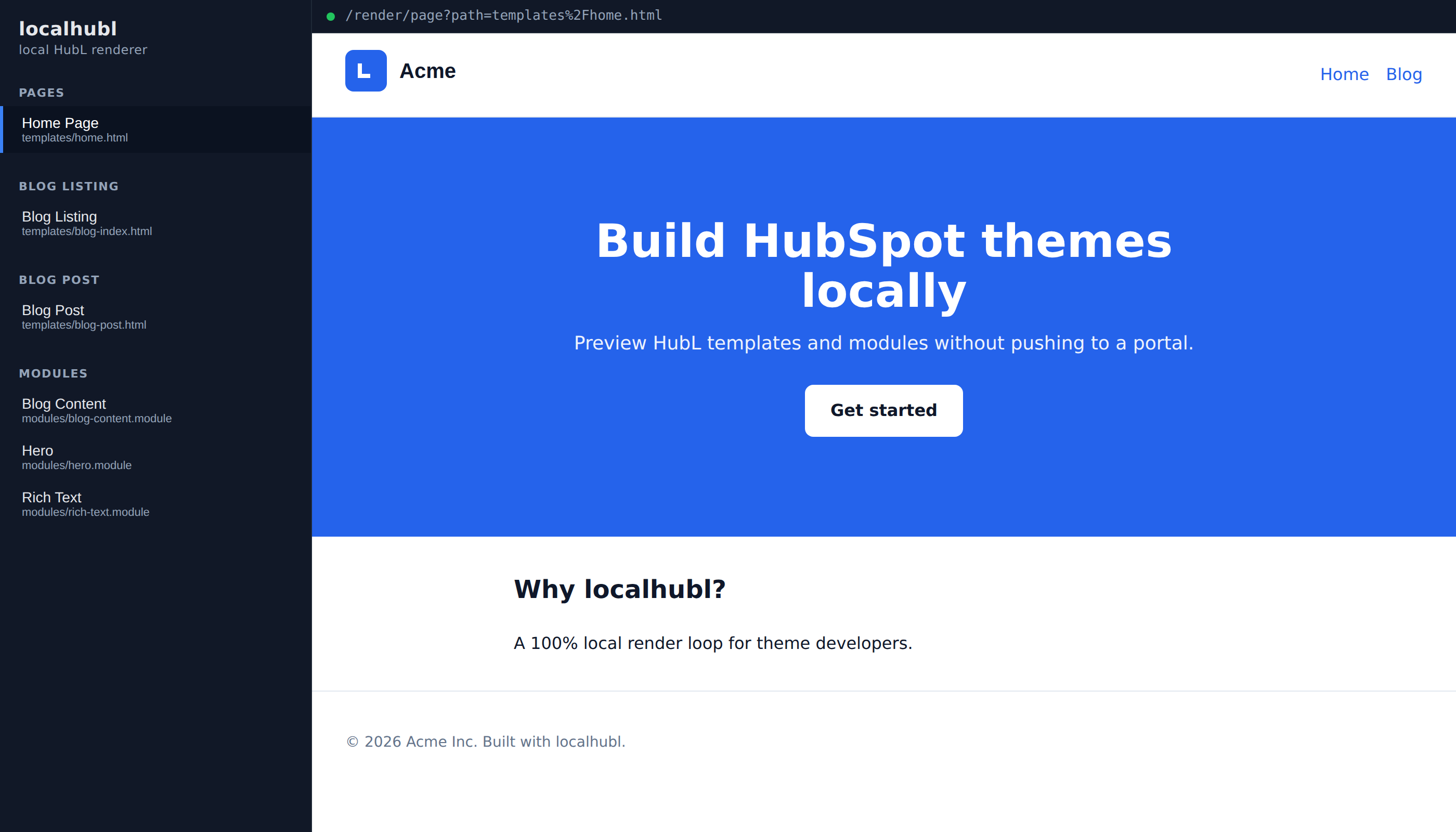
It's not released yet — I still need to work out what state it should be in and how to ship it — so I'll write about it properly another time. I'm very happy with it though.
getting Claude Code to use it took me two tries
Having the renderer was only half the problem. The other half was getting an agent to use it, and my first instinct was to point Claude at the live dev server the same way I use it myself, which turned out to be the wrong call.
What works much better is the batch mode: render the whole theme into a dist/ folder in one go, and let Playwright walk the folder afterwards.
# renders every template and module, writes HTML, exits
mkdir -p dist && docker run --rm --network none \
  -v "$PWD/src/theme/<theme>":/theme:ro \
  -v "$PWD/dist":/out \
  jsiddall/localhubl:latest build --out /out
I think the reasons are all pretty boring ones, honestly. There's no background process to start and no port to keep alive, the command finishes so there's no question about whether it's actually done and I'm not screenshotting a half-loaded page, the container runs with --network none and the theme mounted read only so a render can't reach the internet or touch my source, and because everything is written to disk up front a screenshot pass is just a directory walk instead of a lot of clicking and waiting for live reload to settle.
One rule I had to write down after getting bitten: always render from the published container image and never from a jar I've stashed somewhere. A jar goes stale silently — it renders perfectly happily using an old engine, so a bug you "verified locally" can still ship. That is not hypothetical, it's exactly how a vendored jar that predated an engine fix ended up masking a real defect in our previews.
a screenshot next to every module is the best part
Once the render is just HTML on disk, screenshotting it is easy — Playwright serves the folder over a throwaway local HTTP server (not file://, or none of the stylesheets and fonts resolve) and shoots each page.
The part I did not expect to like as much as I do is where the PNGs go. Each one gets written next to the source file it came from, same name, .png on the end:
modules/hero.module/
  module.html          # the HubL
  module.css
  fields.json
  hero.png             # what we render, committed
  hero-design.png      # what it's meant to look like, committed
Because the image sits right there beside the source, a pull request that changes a module regenerates that module's PNG, and GitHub's Files changed tab renders it as an image diff with 2-up and swipe and onion-skin modes. So you see the visual consequence of a HubL change directly in the review, next to the HubL that caused it. For reviewing theme changes an agent wrote, this is far and away the most useful thing in the whole setup, and it was also one of the cheapest to build. The PNGs are review-only, an .hsignore entry keeps them out of what actually gets uploaded.
pixel jitter is real
It turns out screenshots between runs are not byte-identical, which I probably should have expected — antialiasing moves around, fonts settle slightly differently, a hairline shifts. If you treat every non-zero difference as a failure you drown immediately, and if you try to eyeball a few hundred images you will definitely miss the one that matters, so I got Claude to write an ImageMagick diff that runs across all the committed UI and tells me what percentage of the pixels differ.
It gives two numbers per screenshot and the difference between them is the useful part:
- vsBase compares this branch's PNG against the same file at the base commit, and it's the sharp one — anything I didn't touch should read 0.00%, so a surprise here nearly always means a shared module's CSS leaked into pages that embed it. Flags at 5%.
- vsDesign compares our render against the design reference, and it's blunt and can never get to zero, because the design fixtures use lorem copy and empty image slots while the real templates have form stand-ins and live blog content in them. A perfectly correct render still scores somewhere in the 5–25% range. It flags at 25%, and I tried it at 5% first, which flagged basically the whole repo and meant nobody read it.
A -fuzz 10% tolerance soaks up the antialiasing jitter. It also soaks up a subtle white-to-cream band swap, which I found out the annoying way, so the number is a filter and not a judge.
A single percentage tells you a file moved but not where, which is not much help when the page is five thousand pixels tall, so it also splits both images into blocks and prints a heat map with crop commands you can paste:
      01234567890123
  3100 ::::
  3200###+##########
  3300#:  +#########
  3400##############

  legend: ' '<1%  '.'<5%  ':'<15%  '+'<35%  '#'>=35%

  regions at or above 15% — crop these instead of reading the whole page:
    peak 100%   convert templates/<name>.png -crop 1400x1000+0+3200 +repage /tmp/region.png
That crop is about a fifth of the page, so looking at it costs a fifth as much as opening the whole screenshot. The implementation detail I thought was neat: one ImageMagick call builds a thresholded difference mask and then scales it down by the block size, and because scaling averages, each output pixel just is its block's diff percentage. A tall page takes a fraction of a second that way, where running a compare per tile would have been hundreds of subprocesses.
the pull request template is where the rules actually live
None of this helps if it's optional, so it's all written down as a checklist in the repo's pull request template, which the agent fills in as part of opening the PR. It covers rendering with the latest image, regenerating the screenshot for every module or template that changed, running the image diff and accounting for every flagged row in a table, and confirming nothing got uploaded to production by hand.
My favourite bit of it isn't about images at all though. It's a backwards-compatibility rule: live marketing content is bound to module folder names, template paths and field name keys, so renaming or deleting any of those quietly destroys real pages. Adding is always safe, renaming never is. That's exactly the kind of thing an agent will do cheerfully in the middle of a tidy-up, and exactly the kind of thing a human reviewer's eyes slide off, and writing it down as a checkbox is what makes anyone actually check.
things I don't know yet
I've only really run this properly on one theme, with me as the only person working on it, so I genuinely don't know how it holds up with several people pushing at once — I'd guess the screenshot regeneration would start conflicting constantly, but I haven't hit it.
I also don't know how well the committed baselines age. Right now they're fresh because I made them recently. Ask me in a year whether there's a pile of stale PNGs nobody has looked at.
And I have no real sense of where the cutoff is for this being worth it. For a one-page landing site it would obviously be ridiculous. It pays off on a theme with more modules than I can hold in my head, but I couldn't tell you where in between those two the line sits.
some things it definitely doesn't catch
- localhubl renders HubL, it isn't a HubSpot emulator, and it deliberately doesn't try to be one for anything that depends on portal state — HubDB, CRM objects, forms, menus, memberships, personalisation. Those still need a real portal to check.
- A screenshot diff tells you something moved, not whether that was a regression or the redesign you asked for. Every intentional change means regenerating and re-committing images, which is work.
- Coverage is exactly the set of files that have a committed PNG. A template nobody ever shot is a template nobody is testing, and nothing warns you about it.
- Drag-and-drop areas are where marketers move things around after handoff, and that content lives in the portal rather than the repo, so none of this sees it.
we'll see how it goes
The short version of what changed is that I moved my effort from writing code to constraining it. The editor mattered a lot when I was typing every character, and now I think almost everything that matters is in the feedback loops instead — a renderer that answers in under a second instead of five, an image sitting next to the code that produced it, a diff that reads a thousand screenshots so I don't have to.
A few months isn't very long though, and I've changed my mind about tooling before. The next thing is getting localhubl into a state I'm happy to release. If you build HubSpot themes and you've found something better than this, or I've got something wrong here, I'd really like to hear about it — I'm on LinkedIn.